Yes, and you do not have to start big. Start with one repetitive job that eats your week, let a tool do it with you approving every step, and add more only when it earns your trust.
We are Denecke Media, a web design, video and software company. We run our own AI agents every day, and we help small businesses in any state set up the same kind of automation.
Why should a small business look at AI and automation?
Because most small businesses surveyed already use it. Two 2026 surveys put U.S. small business AI use at 66%. The Thryv survey of 561 owners found 66%, up from 55% a year earlier. Thryv is a software company, and none of the owners surveyed were its customers. The U.S. Chamber's 2026 report also found 66%, up 8 points from 2025.
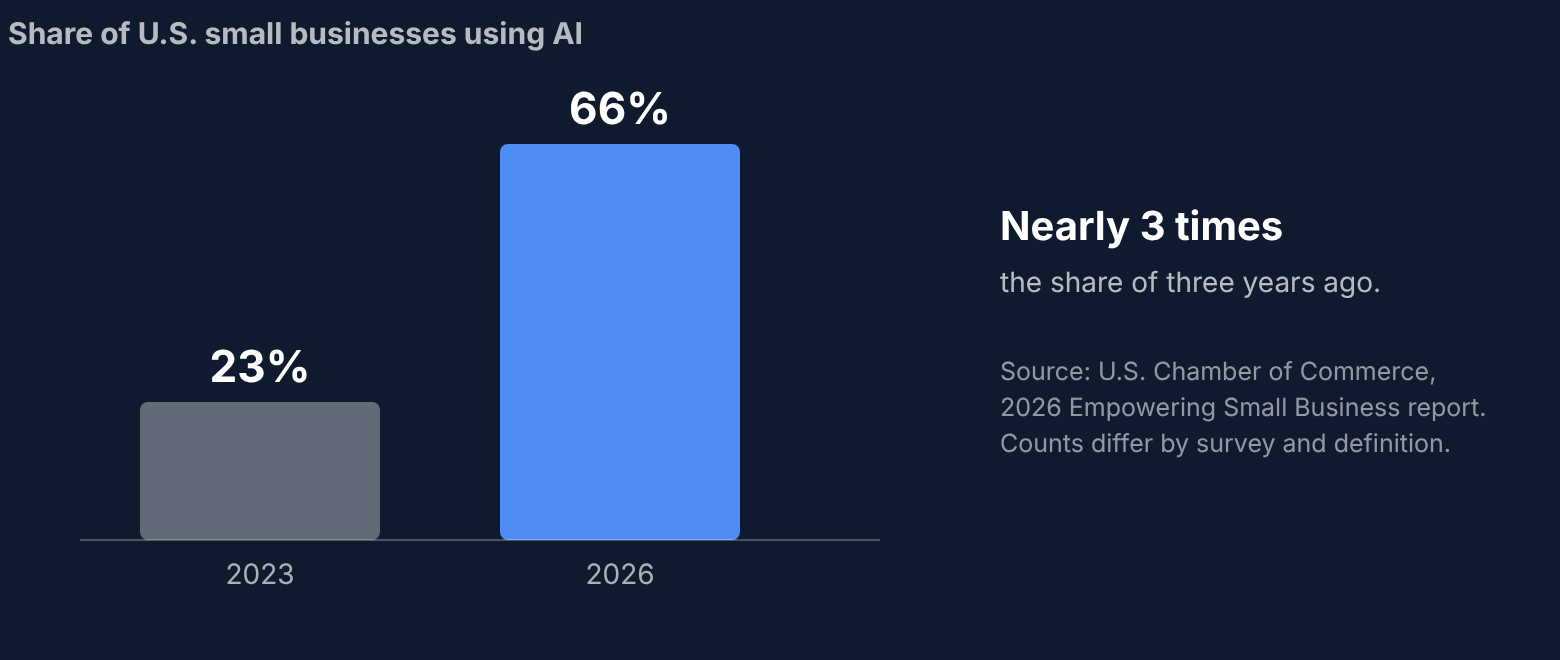
The results owners report are modest and practical, not magic. In a May to June 2026 Ipsos survey of 750 owners for the U.S. Chamber Foundation, 54% of employers using AI said it had a mostly positive effect on how long tasks take. Only 3% to 4% said it had a mostly negative effect on each measure they were asked about.
Two cautions. Surveys count differently: a 2025 Census Bureau survey found 8.8% of small businesses with fewer than 250 employees using AI, as reported by the SBA Office of Advocacy. And 70% of owners in the Thryv survey said they need more training. If you feel unsure where to start, you are in good company.
What does AI and automation look like in a real small business?
Mostly small, boring jobs done faster. Three examples that owners described to the U.S. Chamber of Commerce in October 2026:
- Wyoming Machine used AI to turn a scanned, seven-year-old paper shipping document into an editable Excel file in about a minute. The article says recreating it by hand would have taken about an hour.
- Sonic Promos uses AI to produce proposals that are about 90% complete, which its COO says saves many hours of employee time.
- PolyScience uses AI to review its top engineers' emails so staff can give highly technical support, which frees the engineers to work on new solutions.
The article gives no measured results beyond the one-minute example, and the figures are the owners' own descriptions. The pattern still carries over: a repetitive job, a tool that does the first pass, and a person who checks it.
Which jobs should a small business automate first?
Pick jobs that repeat every week, follow clear rules, and are annoying to do by hand. These five are on the list in one guide to small business automation, and they are a fair starting point:
| Job | What the tool does | What stays with you |
|---|---|---|
| Answering new inquiries | Replies to web form messages, asks the basic questions, sorts leads by service | Prices, availability, anything unusual |
| Following up on quotes | Sends a reminder when a quote goes quiet | Any price discussion or discount |
| Chasing unpaid invoices | Sends polite reminders on a schedule | Anyone who disputes a bill |
| Asking for reviews | Sends one review request after a paid job | Replies to unhappy customers |
| A daily or weekly summary | Pulls new leads, open quotes and late invoices into one message | Deciding what to do about it |
The right column matters most. A good automation hands off anything with money, a complaint or a judgment call. The same guide says to set clear limits, expect a slower setup than you planned, and check the first two weeks of results closely.
How do I start with AI without it going wrong?
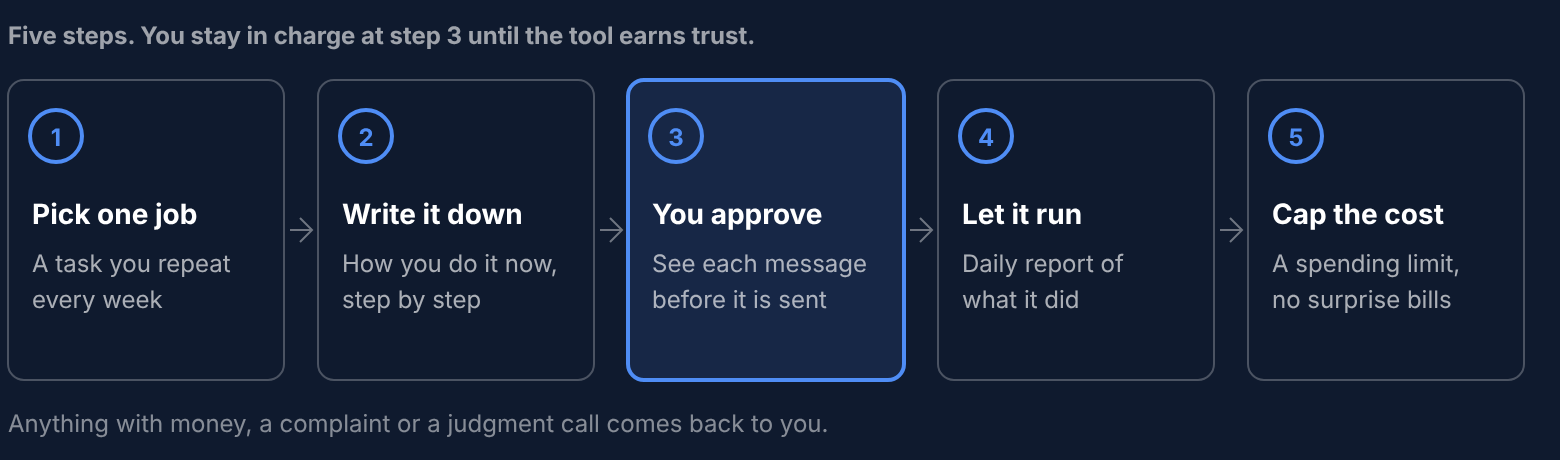
Start with one job and keep a person in the loop until the tool has proven itself. This is close to how we run our own agents, and how we set them up for others:
- Pick one job. Choose something you repeat every week, like answering the same questions or chasing unpaid invoices.
- Write down how you do it today. Step by step, so the tool follows your rules, not its own.
- Run it with an approval step. You see every message before it goes out.
- Let it run on its own once it earns it. You get a daily report of what it did, and anything unusual comes to you.
- Set a spending cap. AI tools bill by use, so a cap keeps a mistake from turning into a surprise bill.
How do AI agents help run Denecke Media?
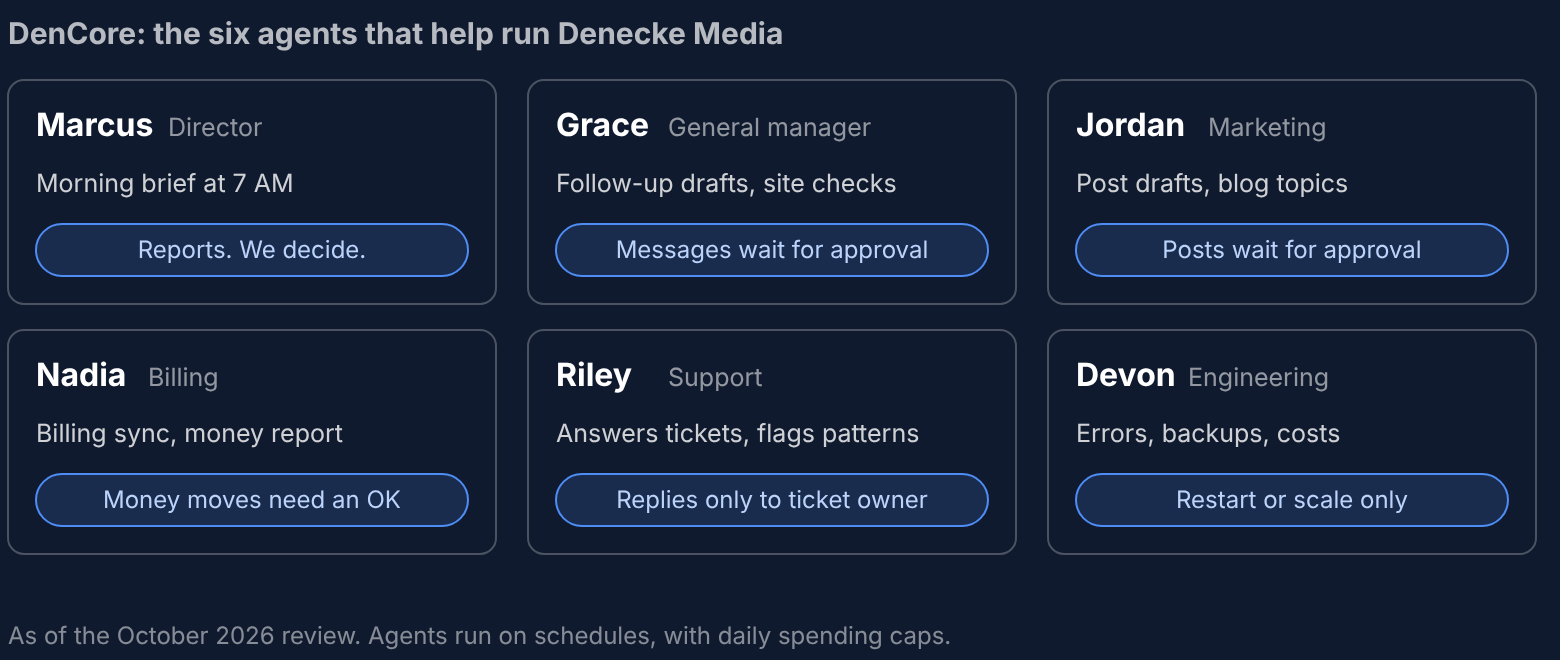
We do not just build this for other people. A team of six AI agents, which we call DenCore, runs a real part of our own business every day. They watch for new leads, draft follow-ups, write marketing drafts, answer support questions, keep an eye on our systems and report on the money. Here is what each one does:
| Agent | Its job here | The guardrail |
|---|---|---|
| Marcus, director | A morning brief at 7 AM: what to do today, anything that needs fixing, the month's money and goal progress | It reports and suggests. We decide. |
| Grace, general manager | Drafts follow-ups to prospects and leads, checks client sites, sends an evening digest and a Monday plan | Every message waits in an approval queue |
| Jordan, marketing | Drafts social posts and ad copy, suggests blog topics from real Google searches, watches competitors | Posts wait for our approval |
| Nadia, billing | Syncs billing, flags payment problems, reports on revenue | Anything that moves money needs a person's OK |
| Riley, support | Watches the support inbox, answers tickets, flags patterns | Replies go only to the customer who owns the ticket |
| Devon, engineering | Checks errors, backups, security and cloud costs around the clock, and alerts us in Slack | It can only restart or scale a few services. Code changes and deploys stay with a person |
As of an internal review in October 2026, these agents ran more than 200 scheduled jobs, from a 7 AM brief to checks every few minutes. That is more routine work than we could do by hand.
What did we learn from running them?
The tools are good at the first pass and fast at repetitive work. They are not good at judgment calls, upset customers or anything involving money, so those stay with a person.
They also break. Our own review of the agents found jobs that were failing, so we run a daily check on whether each one did its job. Automation needs a person watching it, especially at the start.
Two habits made the biggest difference: customer emails, social posts and outreach wait for our approval, and every agent has a daily spending cap, because AI tools bill by use and a loop can get expensive fast.
What can Denecke Media build for my business?
We build custom automation for one job at a time, using the same approach we use ourselves. We start by listening to how your week runs today, then show you the first jobs worth automating, such as answering new leads, sending quotes, follow-ups and invoicing.
Here is how it works:
- We scope it first. You get the job, what the tool will and will not do, and the cost in writing before any work starts.
- It works with the tools you already use. Email, your calendar, your quoting or invoicing system. Each connection is its own piece of work, so we price it that way.
- You approve at first. You see every message before it is sent, and we add automation only as you get comfortable.
- You get a daily report. A short summary of what the tool did, so you never wonder.
- Costs are capped. AI usage has a ceiling on our side, so it cannot run away on your bill.
We do not promise a result, because every business is different. We promise you will know what you are getting, and what it costs, before you commit.
Is there free AI help for small businesses?
Sometimes. Check what your state offers first. One example is that the University of Wisconsin's Office of Business and Entrepreneurship runs the Small Business AI Center, which offers no-cost AI education, tool guidance and help finding use cases for Wisconsin businesses with fewer than 500 employees. No AI experience is needed, and you apply through a short form on their site.
If you want to learn the basics yourself first, look for a program like that in your state. If you would rather hand the setup to someone, that is where we come in.
What about AI laws and insurance?
Two things are changing fast: state AI laws and business insurance. Some insurers now exclude AI claims from business policies, and some ask which AI tools you use and who checks them. The short version: ask your insurance agent whether your policy excludes AI, and keep a written record of what each tool does and who checks it.
When should I wait on AI and automation?
Wait, or at least go slowly, if:
- You cannot describe the job step by step yet. A tool cannot follow rules you have not written down.
- The job depends on judgment, like pricing a complicated project or handling an upset customer.
- You handle sensitive customer records and have not decided who may see them.
- Your website or customer list is a mess. Fix the basics first, because automation repeats whatever is there, good or bad.
How do I get started?
- Tell us how your week runs. Book a free 15-minute workflow chat. No prep needed.
- We pick the first job. We show you the one or two jobs most worth automating, and what each would do and not do.
- You get a written scope and cost. Nothing starts until you say yes.
- We build it with an approval step. You see every message before it goes out.
- It earns its freedom. Once you trust it, it runs on its own with a daily report.
AI and automation help for small businesses in any state
We work with small businesses in any state, not just where we are based. See our AI agents page for how it works.
Frequently asked questions
What is the easiest thing to automate first?
A message you send over and over, like a quote follow-up, an invoice reminder or a reply to a common question. These are repetitive, follow clear rules and are low risk when you approve each one.
Will AI replace my employees?
That is not what small business owners report so far. In the U.S. Chamber's 2026 report, 47% said AI is creating jobs today and 6% said it is enabling headcount reductions. The better way to think about it is that it takes over repetitive work so your people can spend time on the rest.
Is it safe to use AI with customer information?
It depends on the tool and on what you let it see. Start with tools that do not need sensitive records, decide who can see what, and keep a person approving anything customer-facing. We will tell you plainly if a job is a bad fit.
Does my business insurance cover AI mistakes?
Not always. Some 2026 policies include optional exclusions for generative AI claims. Ask your agent for the form numbers of any AI exclusion on your renewal, and keep a list of the AI tools you use and who checks their output.
How much does it cost to automate a task?
It depends on the job and how many tools it touches. AI tools usually bill by use, so we scope the work and put the cost in writing first, and we cap the AI spending. The first 15-minute chat is free.
Do I need to be technical?
No. You describe the job in plain words, and we handle the setup.